> ## Documentation Index
> Fetch the complete documentation index at: https://docs.baato.io/llms.txt
> Use this file to discover all available pages before exploring further.
# Map styles
> Apply Baato's vector map styles in an Android app.
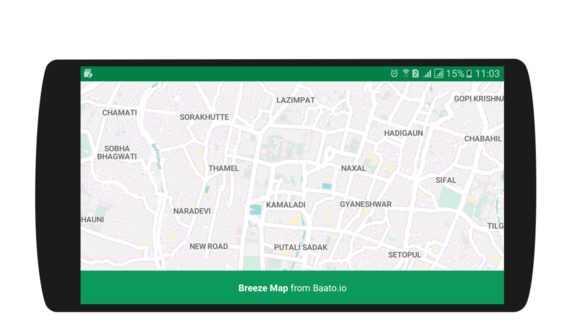
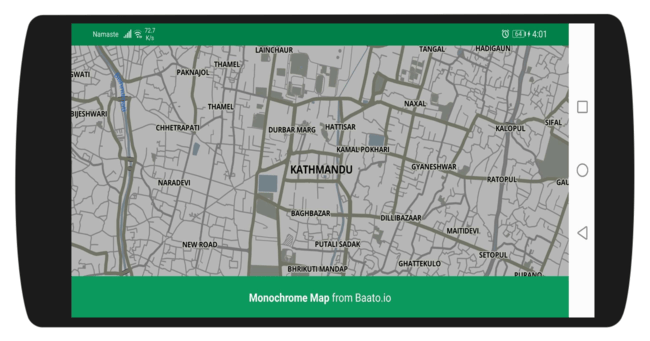
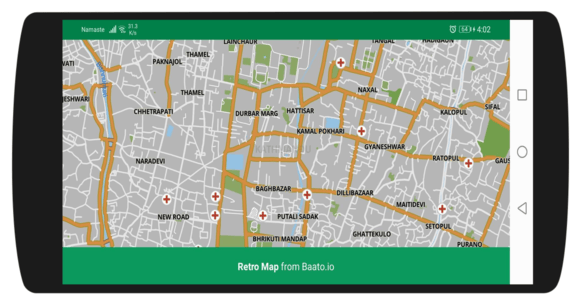
A Baato map style is just a URL. Swapping the look of your map means changing one string —
the rest of the activity stays identical. See the [Map Styles API](/services/styles) for the
full catalogue.
## The styles
 ```groovy theme={null}
//mapbox sdk
implementation('com.mapbox.mapboxsdk:mapbox-android-sdk:6.5.0') {
exclude group: 'group_name', module: 'module_name'
}
implementation 'com.mapbox.mapboxsdk:mapbox-android-plugin-locationlayer:0.8.1'
```
If you use Mapbox as your map service, the Baato Java client currently supports only
the versions pinned above.
```xml theme={null}
```
Pick a tab for the style you want — only the URL changes.
```java theme={null}
mapboxMap.setStyle(
"https://api.baato.io/api/v1/styles/breeze?key=" + getString(R.string.baato_access_token),
style -> {
bottomInfoLayout.setText(Html.fromHtml("Breeze Map from Baato.io"));
bottomInfoLayout.setVisibility(View.VISIBLE);
});
```
```java theme={null}
mapboxMap.setStyle(
"https://api.baato.io/api/v1/styles/monochrome?key=" + getString(R.string.baato_access_token),
style -> {
bottomInfoLayout.setText(Html.fromHtml("Monochrome Map from Baato.io"));
bottomInfoLayout.setVisibility(View.VISIBLE);
});
```
```java theme={null}
mapboxMap.setStyle(
"https://api.baato.io/api/v1/styles/retro?key=" + getString(R.string.baato_access_token),
style -> {
bottomInfoLayout.setText(Html.fromHtml("Retro Map from Baato.io"));
bottomInfoLayout.setVisibility(View.VISIBLE);
});
```
Custom styles you build in the **My Styles** section of your
[account dashboard](https://baato.io/account) work exactly the same way.
```java theme={null}
mapboxMap.setStyle(
"https://api.baato.io/api/v1/styles/YOUR_STYLE_NAME?key=" + getString(R.string.baato_access_token),
style -> {
bottomInfoLayout.setVisibility(View.VISIBLE);
});
```
Turn off the Mapbox branding and add the Baato logo. Download
[the logo](https://i.postimg.cc/k5DpLQKQ/baato-Logo.png) into `res/drawable` first.
```java theme={null}
mapView = findViewById(R.id.mapView);
bottomInfoLayout = findViewById(R.id.bottomInfoLayout);
Mapbox.getInstance(this, getString(R.string.mapbox_token));
mapView.onCreate(savedInstanceState);
mapView.getMapAsync(mapboxMap -> {
// remove the Mapbox attribution
mapboxMap.getUiSettings().setAttributionEnabled(false);
mapboxMap.getUiSettings().setLogoEnabled(false);
// add the Baato logo
final FrameLayout.LayoutParams params = new FrameLayout.LayoutParams(250, 104);
params.gravity = Gravity.BOTTOM | Gravity.LEFT;
params.setMargins(12, 12, 12, 12);
ImageView imageview = new ImageView(this);
imageview.setImageResource(R.drawable.baato_logo);
imageview.setLayoutParams(params);
mapView.addView(imageview);
// then set the style, as in the previous step
});
```
Displaying Baato and OpenStreetMap attribution is a condition of use. See
[Attribution requirements](/resources/attribution).
A `MapView` leaks if you skip this — every lifecycle callback must be forwarded.
```java theme={null}
@Override
public void onResume() {
super.onResume();
mapView.onResume();
}
@Override
protected void onStart() {
super.onStart();
mapView.onStart();
}
@Override
protected void onStop() {
super.onStop();
mapView.onStop();
}
@Override
public void onPause() {
super.onPause();
mapView.onPause();
}
@Override
public void onLowMemory() {
super.onLowMemory();
mapView.onLowMemory();
}
@Override
protected void onDestroy() {
super.onDestroy();
mapView.onDestroy();
}
@Override
protected void onSaveInstanceState(Bundle outState) {
super.onSaveInstanceState(outState);
mapView.onSaveInstanceState(outState);
}
```
## Full source
Each style has a standalone activity in the demo app:
```groovy theme={null}
//mapbox sdk
implementation('com.mapbox.mapboxsdk:mapbox-android-sdk:6.5.0') {
exclude group: 'group_name', module: 'module_name'
}
implementation 'com.mapbox.mapboxsdk:mapbox-android-plugin-locationlayer:0.8.1'
```
If you use Mapbox as your map service, the Baato Java client currently supports only
the versions pinned above.
```xml theme={null}
```
Pick a tab for the style you want — only the URL changes.
```java theme={null}
mapboxMap.setStyle(
"https://api.baato.io/api/v1/styles/breeze?key=" + getString(R.string.baato_access_token),
style -> {
bottomInfoLayout.setText(Html.fromHtml("Breeze Map from Baato.io"));
bottomInfoLayout.setVisibility(View.VISIBLE);
});
```
```java theme={null}
mapboxMap.setStyle(
"https://api.baato.io/api/v1/styles/monochrome?key=" + getString(R.string.baato_access_token),
style -> {
bottomInfoLayout.setText(Html.fromHtml("Monochrome Map from Baato.io"));
bottomInfoLayout.setVisibility(View.VISIBLE);
});
```
```java theme={null}
mapboxMap.setStyle(
"https://api.baato.io/api/v1/styles/retro?key=" + getString(R.string.baato_access_token),
style -> {
bottomInfoLayout.setText(Html.fromHtml("Retro Map from Baato.io"));
bottomInfoLayout.setVisibility(View.VISIBLE);
});
```
Custom styles you build in the **My Styles** section of your
[account dashboard](https://baato.io/account) work exactly the same way.
```java theme={null}
mapboxMap.setStyle(
"https://api.baato.io/api/v1/styles/YOUR_STYLE_NAME?key=" + getString(R.string.baato_access_token),
style -> {
bottomInfoLayout.setVisibility(View.VISIBLE);
});
```
Turn off the Mapbox branding and add the Baato logo. Download
[the logo](https://i.postimg.cc/k5DpLQKQ/baato-Logo.png) into `res/drawable` first.
```java theme={null}
mapView = findViewById(R.id.mapView);
bottomInfoLayout = findViewById(R.id.bottomInfoLayout);
Mapbox.getInstance(this, getString(R.string.mapbox_token));
mapView.onCreate(savedInstanceState);
mapView.getMapAsync(mapboxMap -> {
// remove the Mapbox attribution
mapboxMap.getUiSettings().setAttributionEnabled(false);
mapboxMap.getUiSettings().setLogoEnabled(false);
// add the Baato logo
final FrameLayout.LayoutParams params = new FrameLayout.LayoutParams(250, 104);
params.gravity = Gravity.BOTTOM | Gravity.LEFT;
params.setMargins(12, 12, 12, 12);
ImageView imageview = new ImageView(this);
imageview.setImageResource(R.drawable.baato_logo);
imageview.setLayoutParams(params);
mapView.addView(imageview);
// then set the style, as in the previous step
});
```
Displaying Baato and OpenStreetMap attribution is a condition of use. See
[Attribution requirements](/resources/attribution).
A `MapView` leaks if you skip this — every lifecycle callback must be forwarded.
```java theme={null}
@Override
public void onResume() {
super.onResume();
mapView.onResume();
}
@Override
protected void onStart() {
super.onStart();
mapView.onStart();
}
@Override
protected void onStop() {
super.onStop();
mapView.onStop();
}
@Override
public void onPause() {
super.onPause();
mapView.onPause();
}
@Override
public void onLowMemory() {
super.onLowMemory();
mapView.onLowMemory();
}
@Override
protected void onDestroy() {
super.onDestroy();
mapView.onDestroy();
}
@Override
protected void onSaveInstanceState(Bundle outState) {
super.onSaveInstanceState(outState);
mapView.onSaveInstanceState(outState);
}
```
## Full source
Each style has a standalone activity in the demo app: