> ## Documentation Index
> Fetch the complete documentation index at: https://docs.baato.io/llms.txt
> Use this file to discover all available pages before exploring further.

# Autocomplete

> Add a search-as-you-type place picker to a web page.

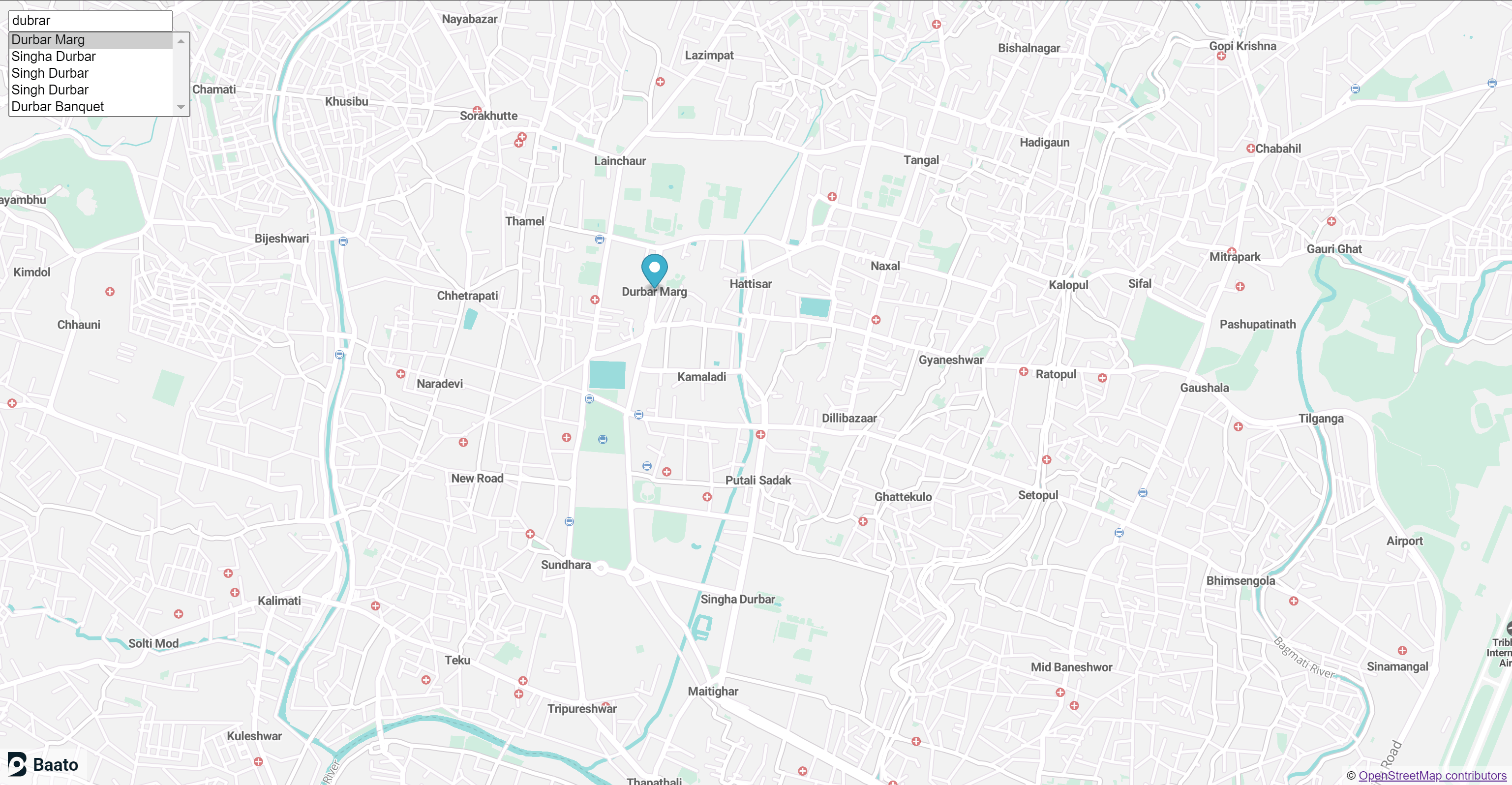
This example shows you how to make use of a bundled Baato JavaScript Library to create an interactive search element in HTML.

<Frame caption="Search-as-you-type suggestions on a web map">
  <img src="https://mintcdn.com/baato/3GUKEGLT42m2snov/images/html/autocomplete.png?fit=max&auto=format&n=3GUKEGLT42m2snov&q=85&s=5a7cd661b94aa95689610868e952a93b" alt="A place picker over a Baato web map" width="3074" height="1596" data-path="images/html/autocomplete.png" />
</Frame>

<CodeGroup>
  ```html MapLibre GL JS theme={null}
  <!DOCTYPE html>
  <html lang="en">

  <head>
      <meta charset="UTF-8" />
      <meta name="viewport" content="width=device-width, initial-scale=1.0" />
      <title>Places API</title>
      <script src="https://unpkg.com/maplibre-gl@1.15.2/dist/maplibre-gl.js"></script>
      <link href="https://unpkg.com/maplibre-gl@1.15.2/dist/maplibre-gl.css" rel="stylesheet" />
      <style>
          body {
              margin: 0;
              padding: 0;
          }
      </style>
  </head>

  <body>
      <div id="map" style="position: absolute; top: 0; bottom: 0; width: 100%;">
          <div
              style="z-index: 10; padding: 0 5px;background-color: hsla(0,0%,100%,.5);margin: 0; position:absolute; bottom:0px; right: 0px">
              © <a href="https://www.openstreetmap.org/copyright" rel="noopener noreferrer no follow"
                  target="_blank">OpenStreetMap contributors</a></div>
          <div
              style="z-index: 100; padding: 0 5px;background-color: hsla(0,0%,100%,.5);margin: 0; position:absolute; bottom:0px; left: 0px">
              <a href="https://baato.io" rel="noopener noreferrer no follow" target="_blank"><img
                      src="https://sgp1.digitaloceanspaces.com/baatocdn/images/BaatoLogo.svg" alt="Baato"
                      width="80px"></img></a>
          </div>
      </div>
      <div>
          <div style="position: absolute; top: 10px; left: 10px; z-index: 1;">
              <div style="position: relative; width: 200px; height: 25px; border: 0; padding: 0; margin: 0;">
                  <input type="text" oninput="search(this.value)" placeholder="Search for a place..." />
                  <select id="text_editors-select" autocomplete="nope" style="width: 185px; display: block;"
                      onChange="searchByPlaceId(this.value)">
                      <option value="Atom">Suggestions: </option>
                  </select>
              </div>
          </div>
      </div>
      </div>
      <script src="https://www.unpkg.com/@klltech/baato-js-client@1.2.0/dist/bundle.js"></script>
      <script>
          var markers = [];

          var map = new maplibregl.Map({
              container: "map",
              style: "https://api.baato.io/api/v1/styles/breeze?key=YOUR_BAATO_ACCESS_TOKEN", // Baato stylesheet location
              center: [85.324, 27.7172], // starting position [lng, lat]
              zoom: 12, // starting zoom
          });

          function search(query) {
              const search = new Baato.Search()
                  .setBaseUrl(`https://api.baato.io/api`) // Baato base URL
                  .setKey("YOUR_BAATO_ACCESS_TOKEN") // Baato access token
                  .setQuery(query) // query to search for
                  .setLimit(5) // limit the number of responses
                  .doRequest()
                  .then((res) => {
                      var select = document.getElementById("text_editors-select");
                      var length = select.options.length;
                      for (i = length - 1; i >= 0; i--) {
                          select.options[i] = null;
                      }
                      for (var i in res.data) {
                          select.add(new Option(res.data[i].name, res.data[i].placeId));
                      }
                      document.getElementById("text_editors-select").size = 5;
                  });
          }

          function clearMarkers() {
              markers.forEach((marker) => marker.remove());
              markers = [];
          }

          function searchByPlaceId(placeId) {
              new Baato.Places()
                  .setBaseUrl(`https://api.baato.io/api`) // Baato base URL
                  .setPlaceId(placeId) // PlaceId for the place to search
                  .setKey("YOUR_BAATO_ACCESS_TOKEN") // your Baato access key
                  .doRequest()
                  .then((res) => {
                      clearMarkers();
                      var marker = new maplibregl.Marker()
                          .setLngLat([res.data[0].centroid.lon, res.data[0].centroid.lat]) // setting latitude and longtitude for marker
                          .addTo(map);
                      markers.push(marker);
                      // zoom map to the point where clicked
                      map.flyTo({
                          center: [res.data[0].centroid.lon, res.data[0].centroid.lat],
                          zoom: 15,
                          essential: true,

                      });
                  });
          }
      </script>
  </body>

  </html>
  ```

  ```html Mapbox GL JS theme={null}
  <!DOCTYPE html>
  <html lang="en">

  <head>
      <meta charset="UTF-8" />
      <meta name="viewport" content="width=device-width, initial-scale=1.0" />
      <title>Places API</title>
      <script src="https://api.mapbox.com/mapbox-gl-js/v1.11.0/mapbox-gl.js"></script>
      <link href="https://api.mapbox.com/mapbox-gl-js/v1.11.0/mapbox-gl.css" rel="stylesheet" />
      <style>
          body {
              margin: 0;
              padding: 0;
          }
      </style>
  </head>

  <body>
      <div id="map" style="position: absolute; top: 0; bottom: 0; width: 100%;">
          <div
              style="z-index: 10; padding: 0 5px;background-color: hsla(0,0%,100%,.5);margin: 0; position:absolute; bottom:0px; right: 0px">
              © <a href="https://www.openstreetmap.org/copyright" rel="noopener noreferrer no follow"
                  target="_blank">OpenStreetMap contributors</a></div>
          <div
              style="z-index: 100; padding: 0 5px;background-color: hsla(0,0%,100%,.5);margin: 0; position:absolute; bottom:0px; left: 0px">
              <a href="https://baato.io" rel="noopener noreferrer no follow" target="_blank"><img
                      src="https://sgp1.digitaloceanspaces.com/baatocdn/images/BaatoLogo.svg" alt="Baato"
                      width="80px"></img></a>
          </div>
      </div>
      <div>
          <div style="position: absolute; top: 10px; left: 10px; z-index: 1;">
              <div style="position: relative; width: 200px; height: 25px; border: 0; padding: 0; margin: 0;">
                  <input type="text" oninput="search(this.value)" placeholder="Search for a place..." />
                  <select id="text_editors-select" autocomplete="nope" style="width: 185px; display: block;"
                      onChange="searchByPlaceId(this.value)">
                      <option value="Atom">Suggestions: </option>
                  </select>
              </div>
          </div>
      </div>
      </div>
      <script src="https://www.unpkg.com/@klltech/baato-js-client@1.2.0/dist/bundle.js"></script>
      <script>
          var markers = [];

          var map = new mapboxgl.Map({
              container: "map",
              style: "https://api.baato.io/api/v1/styles/breeze?key=YOUR_BAATO_ACCESS_TOKEN", // Baato stylesheet location
              center: [85.324, 27.7172], // starting position [lng, lat]
              zoom: 12, // starting zoom
          });

          function search(query) {
              const search = new Baato.Search()
                  .setBaseUrl(`https://api.baato.io/api`) // Baato base URL
                  .setKey("YOUR_BAATO_ACCESS_TOKEN") // Baato access token
                  .setQuery(query) // query to search for
                  .setLimit(5) // limit the number of responses
                  .doRequest()
                  .then((res) => {
                      var select = document.getElementById("text_editors-select");
                      var length = select.options.length;
                      for (i = length - 1; i >= 0; i--) {
                          select.options[i] = null;
                      }
                      for (var i in res.data) {
                          select.add(new Option(res.data[i].name, res.data[i].placeId));
                      }
                      document.getElementById("text_editors-select").size = 5;
                  });
          }

          function clearMarkers() {
              markers.forEach((marker) => marker.remove());
              markers = [];
          }

          function searchByPlaceId(placeId) {
              new Baato.Places()
                  .setBaseUrl(`https://api.baato.io/api`) // Baato base URL
                  .setPlaceId(placeId) // PlaceId for the place to search
                  .setKey("YOUR_BAATO_ACCESS_TOKEN") // your Baato access key
                  .doRequest()
                  .then((res) => {
                      clearMarkers();
                      var marker = new mapboxgl.Marker()
                          .setLngLat([res.data[0].centroid.lon, res.data[0].centroid.lat]) // setting latitude and longtitude for marker
                          .addTo(map);
                      markers.push(marker);
                      // zoom map to the point where clicked
                      map.flyTo({
                          center: [res.data[0].centroid.lon, res.data[0].centroid.lat],
                          zoom: 15,
                          essential: true,

                      });
                  });
          }
      </script>
  </body>

  </html>
  ```
</CodeGroup>