

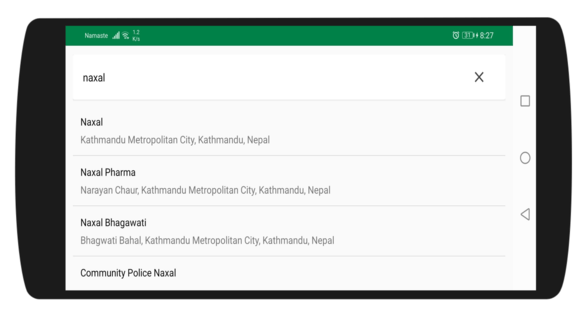
Place suggestions in an Android app
Before you begin, please make sure you have the Baato Java Library installed in your app.
1
Design the layout
<androidx.cardview.widget.CardView
    android:id="@+id/searchLayout"
    android:layout_width="match_parent"
    android:layout_height="wrap_content"
    android:layout_alignParentTop="true">

    <LinearLayout
        android:layout_width="match_parent"
        android:layout_height="wrap_content"
        android:gravity="center_vertical"
        android:orientation="horizontal"
        android:padding="@dimen/normal_margin"
        android:weightSum="10">

        <EditText
            android:id="@+id/etSearchQuery"
            android:layout_width="0dp"
            android:layout_height="wrap_content"
            android:layout_weight="9"
            android:background="@null"
            android:ellipsize="end"
            android:gravity="center_vertical"
            android:hint="@string/search_here"
            android:minHeight="@dimen/edit_box_height"
            android:paddingLeft="@dimen/normal_margin"
            android:paddingRight="@dimen/general_margin"
            android:singleLine="true"
            android:textColor="@color/colorBlack"
            android:textColorHint="@color/colorBlack"
            android:textSize="@dimen/medium_text_size" />

        <ImageView
            android:id="@+id/btnClose"
            android:layout_width="0dp"
            android:layout_height="wrap_content"
            android:layout_weight="1"
            android:src="@drawable/ic_close_black_24dp"
            android:tint="@color/colorDarkGrey"
            android:visibility="gone" />
    </LinearLayout>
</androidx.cardview.widget.CardView>
2
Wire up the views in onCreate
public class SearchActivity extends AppCompatActivity {
    EditText etSearch;
    ImageView btnClose;

    @Override
    protected void onCreate(Bundle savedInstanceState) {
        super.onCreate(savedInstanceState);
        setContentView(R.layout.activity_search);

        etSearch = findViewById(R.id.etSearchQuery);
        btnClose = findViewById(R.id.btnClose);
        setUpViews(); //To handle search query
}
3
Watch the input with a TextWatcher
private void setUpViews() {
    recyclerView.setLayoutManager(new LinearLayoutManager(this));
    if (recyclerView.getItemDecorationCount() == 0)
        recyclerView.addItemDecoration(new DividerItemDecoration(this, DividerItemDecoration.VERTICAL));

    btnClose.setOnClickListener(View -> {
        etSearch.setText("");
    });

    etSearch.requestFocus();
    etSearch.addTextChangedListener(new TextWatcher() {
        @Override
        public void beforeTextChanged(CharSequence s, int start, int count, int after) {
        }

        @Override
        public void onTextChanged(CharSequence s, int start, int before, int count) {
            checkEmpty(s);
        }

        @Override
        public void afterTextChanged(Editable s) {
        }
    });
}

private void checkEmpty(CharSequence s) {
    if (!s.toString().isEmpty()) {
        btnClose.setVisibility(View.VISIBLE);
        searchTheQuery(s.toString());
    } else {
        btnClose.setVisibility(GONE);
        showKeyboard(etSearch);
    }
}

private void showKeyboard(EditText etSearch) {
    InputMethodManager imm = (InputMethodManager) getSystemService(Context.INPUT_METHOD_SERVICE);
    imm.showSoftInput(etSearch, InputMethodManager.SHOW_IMPLICIT);
}
4
Run the search with BaatoSearch
You can now use the
BaatoSearch() constructor from the baato-java-client, to perform the actual search request, and handle events.private void searchTheQuery(String query) {
new BaatoSearch(this)
.setAccessToken(getString(R.string.baato_access_token))
.setQuery(query)
.withListener(new BaatoSearch.BaatoSearchRequestListener() {
@Override
public void onSuccess(SearchAPIResponse places) {
// get the list of search results and add it to the recycler view adapter
if (places.getData() != null && places.getData().size() > 0) {
hideErrorMessage();
recyclerView.setAdapter(new SearchAdapter(places.getData(), SearchActivity.this));
} else
showErrorMessage("Empty results!\nCouldn't find any matching results for the " + query);
progressBar.setVisibility(GONE);
}
@Override
public void onFailed(Throwable error) {
// get the error messages here
Toast.makeText(SearchActivity.this, "" + error.getMessage(), Toast.LENGTH_SHORT).show();
}
})
.doRequest();
}