

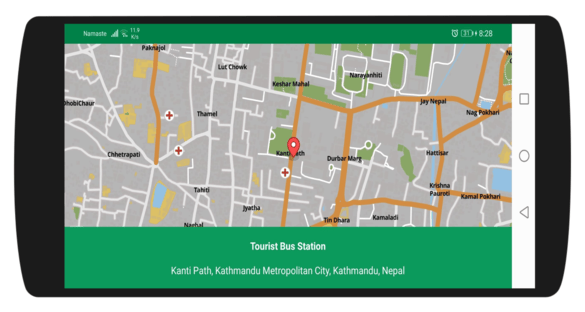
A dropped pin resolved to an address
Before you begin, please make sure you have the Baato Java Library installed in your app.
1
Add the dependency
Specify the required dependency configuration in your app’s build.gradle file.
//mapbox sdk
  implementation('com.mapbox.mapboxsdk:mapbox-android-sdk:6.5.0') {
      exclude group: 'group_name', module: 'module_name'
  }
  implementation 'com.mapbox.mapboxsdk:mapbox-android-plugin-locationlayer:0.8.1'
If you are using MapBox as your map service, the Baato client currently supports only the versions pinned above.
2
Add a MapView to your layout
    <com.mapbox.mapboxsdk.maps.MapView
        android:id="@+id/mapView"
        android:layout_width="match_parent"
        android:layout_height="match_parent"
        mapbox:mapbox_cameraTargetLat="27.7084"
        mapbox:mapbox_cameraTargetLng="85.3206"
        mapbox:mapbox_cameraZoom="13"
        android:visibility="visible"
        />
3
Instantiate the MapView with a Baato style
public class LocationPickerActivity extends AppCompatActivity {
    private MapView mapView;
    private MapboxMap mapboxMap;
    private TextView bottomInfoLayout;
    private Icon selectedMarkerIcon;
    private MarkerOptions marker;

    @Override
    protected void onCreate(Bundle savedInstanceState) {
        super.onCreate(savedInstanceState);
        setContentView(R.layout.activity_location_picker);
        mapView = findViewById(R.id.mapView);
        bottomInfoLayout = findViewById(R.id.bottomInfoLayout);

        Mapbox.getInstance(this, getString(R.string.mapbox_token));
        mapView.onCreate(savedInstanceState);
        mapView.getMapAsync(mapboxMap ->
        {
            //remove mapbox attribute
            mapboxMap.getUiSettings().setAttributionEnabled(false);
            mapboxMap.getUiSettings().setLogoEnabled(false);
            //add your map style url here
            mapboxMap.setStyleUrl("https://api.baato.io/api/v1/styles/retro?key=" + getString(R.string.baato_access_token),
                    style -> {
                        this.mapboxMap = mapboxMap;
                        mapView.setVisibility(View.VISIBLE);
                        initClickedMarker(mapboxMap); //to initialize a marker icon for selected location
                    });
        });
    }
4
Handle map taps with a MapClickListener
    private void initClickedMarker(MapboxMap mapboxMap) {
        Drawable drawabled = ResourcesCompat.getDrawable(getResources(), R.drawable.mapbox_marker_icon_default, null);
        Bitmap dBitmap = BitmapUtils.getBitmapFromDrawable(drawabled);
        assert dBitmap != null;
        IconFactory mIconFactory = IconFactory.getInstance(this);
        selectedMarkerIcon = mIconFactory.fromBitmap(dBitmap);

        // Handle tap events on the map
        mapboxMap.addOnMapClickListener(point ->
                updateMarkerPosition(point));
    }

    // Change the position of the marker
    private void updateMarkerPosition(LatLng point) {
        if (marker == null) {
            marker = new MarkerOptions().icon(selectedMarkerIcon).position(point);
            mapboxMap.addMarker(marker);
        } else if (!mapboxMap.getMarkers().isEmpty()) {
            Marker marker = mapboxMap.getMarkers().get(0);
            marker.setPosition(point);
            mapboxMap.updateMarker(marker);
        }
        moveCameraTo(point);

        getAddressFromLibrary(point); // To make a reverse geocoding search using the tapped coordinates
    }

    private void moveCameraTo(LatLng point) {
        double zoom = mapboxMap.getCameraPosition().zoom;
        if (zoom < 10)
            zoom = 13;
        else if (zoom < 13)
            zoom = 15;
        else if (zoom < 15)
            zoom = zoom + 1;
        else if (zoom < 18)
            zoom = zoom + 1;
        mapboxMap.animateCamera(CameraUpdateFactory.newLatLngZoom(point, zoom), 300);
    }
5
Reverse geocode the marker position
Follow java-library to add the required dependency and perform reverse search using baato reverse search library wherever the user taps on the map.
    private void getAddressFromLibrary(LatLng point) {
        new BaatoReverse(this)
                .setLatLon(new LatLon(point.getLatitude(), point.getLongitude()))
                .setAccessToken(getString(R.string.baato_access_token))
                .setRadius(2)
                .withListener(new BaatoReverse.BaatoReverseRequestListener() {
                    @Override
                    public void onSuccess(PlaceAPIResponse places) {

                        // If the geocoder returns a result, we take the first in the list and show the address with the place name.
                        if (!places.getData().isEmpty()) {
                            Place place = places.getData().get(0);
                            bottomInfoLayout.setText(Html.fromHtml("<b><h6>" + place.getName() + "</h6></b>" + place.getAddress()));
                        } else {
                            bottomInfoLayout.setText("No address found!");
                        }
                    }

                    @Override
                    public void onFailed(Throwable error) {
                        bottomInfoLayout.setText(error.getMessage());
                    }
                })
                .doRequest();
    }