

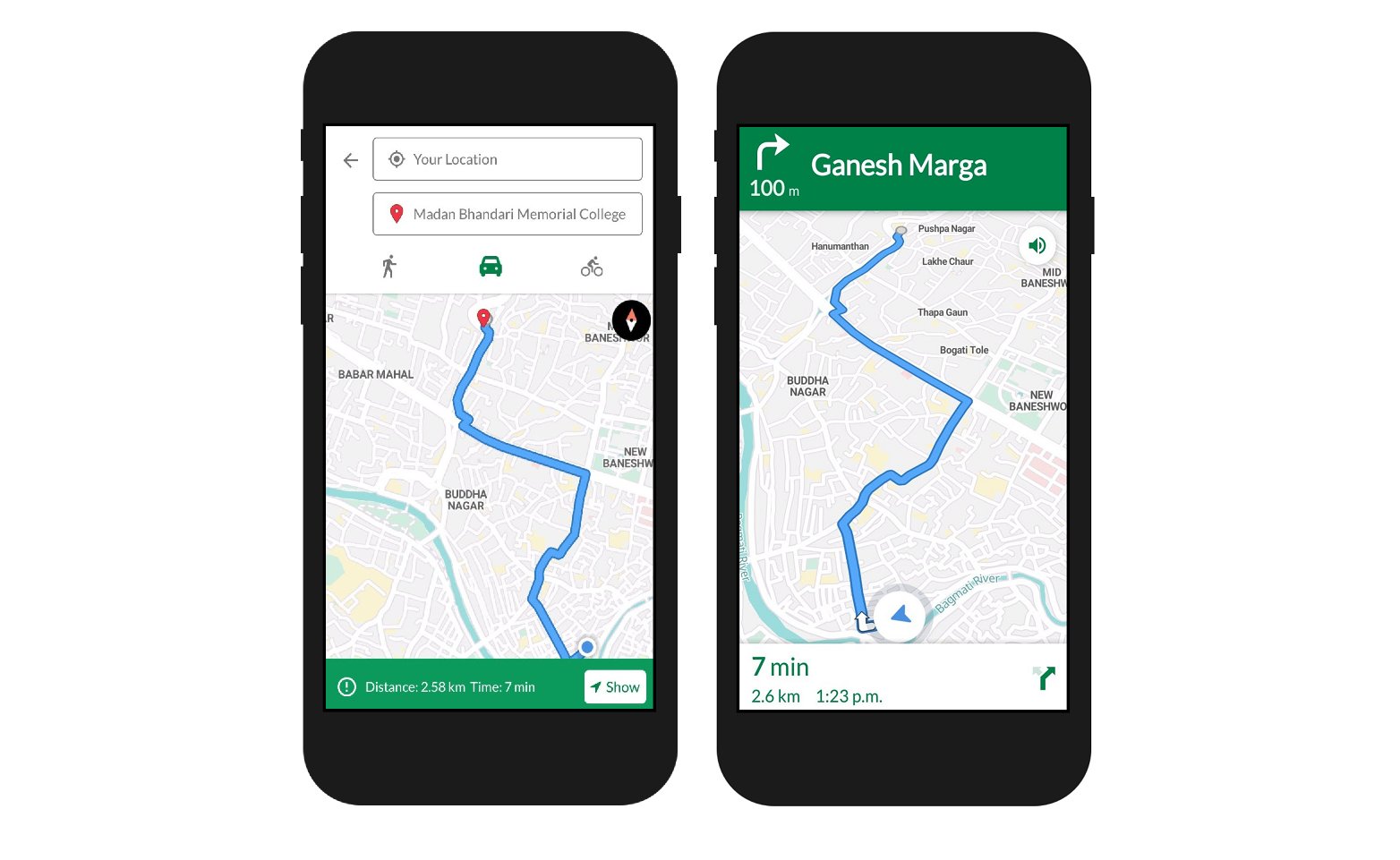
The finished navigation screen
Before you begin, install the Baato Java client and set up the
Navigation SDK. This guide assumes both are in place.
Building the route screen
1
Add the dependency
Specify the required dependency configuration in your app’s build.gradle file.
//mapbox sdk
  implementation('com.mapbox.mapboxsdk:mapbox-android-sdk:6.5.0') {
      exclude group: 'group_name', module: 'module_name'
  }
  implementation 'com.mapbox.mapboxsdk:mapbox-android-plugin-locationlayer:0.8.1'
If you use Mapbox as your map service, the Baato Java client currently supports
only the versions pinned above.
2
Add a MapView and apply a Baato style
    <com.mapbox.mapboxsdk.maps.MapView
        android:id="@+id/mapView"
        android:layout_width="match_parent"
        android:layout_height="match_parent"
        mapbox:mapbox_cameraTargetLat="27.7084"
        mapbox:mapbox_cameraTargetLng="85.3206"
        mapbox:mapbox_cameraZoom="13"
        />
mapView = findViewById(R.id.mapView);
    Mapbox.getInstance(this, getString(R.string.mapbox_token));
    mapView.onCreate(savedInstanceState);
    mapView.getMapAsync(mapboxMap ->
    {
        //remove mapbox attribute
        mapboxMap.getUiSettings().setAttributionEnabled(false);
        mapboxMap.getUiSettings().setLogoEnabled(false);
        mapboxMap.setStyle("https://api.baato.io/api/v1/styles/retro?key=" + getString(R.string.baato_access_token),
                style -> {
                    this.mapboxMap = mapboxMap;
                });
    });
}
3
Request location permission and start the location engine
private void initLocationLayer() {
        locationLayer = new LocationLayerPlugin(mapView, mapboxMap, locationEngine);
        locationLayer.setRenderMode(RenderMode.COMPASS);
    }

    private void initLocationEngine() {
        if (PermissionsManager.areLocationPermissionsGranted(this)) {
           getMyLocation();//initiate location engine on permission grant
        } else {
            permissionsManager = new PermissionsManager(this);
            permissionsManager.requestLocationPermissions(this);
        }
    }

    @Override
    public void onRequestPermissionsResult(int requestCode, @NonNull String[] permissions, @NonNull int[] grantResults) {
        if (requestCode == Constants.PHONE_STATE_PERMISSION_REQUEST) {
            if (grantResults[0] != PackageManager.PERMISSION_GRANTED) {
                displayPhoneStateRequiredDialog(this);
            } else
                callTurnByTurnNavigationActivity();
        } else
            permissionsManager.onRequestPermissionsResult(requestCode, permissions, grantResults);
    }

    @Override
    public void onExplanationNeeded(List<String> permissionsToExplain) {
        Toast.makeText(this, R.string.user_location_permission_explanation, Toast.LENGTH_LONG).show();
    }

    @Override
    public void onPermissionResult(boolean granted) {
        if (granted)
            Toast.makeText(this, "Please wait ...", Toast.LENGTH_LONG).show();
        getMyLocation();
    }
private void getMyLocation() {
        if (googleApiClient != null) {
            if (googleApiClient.isConnected()) {
                int permissionLocation = 0;
                if (android.os.Build.VERSION.SDK_INT >= android.os.Build.VERSION_CODES.M) {
                    permissionLocation = checkSelfPermission(
                            Manifest.permission.ACCESS_FINE_LOCATION);
                }
                if (permissionLocation == PackageManager.PERMISSION_GRANTED) {
                    mylocation = LocationServices.FusedLocationApi.getLastLocation(googleApiClient);
                    LocationRequest locationRequest = new LocationRequest();
                    locationRequest.setInterval(3000);
                    locationRequest.setFastestInterval(3000);
                    locationRequest.setPriority(LocationRequest.PRIORITY_LOW_POWER);
                    LocationSettingsRequest.Builder builder = new LocationSettingsRequest.Builder()
                            .addLocationRequest(locationRequest);
                    builder.setAlwaysShow(true);
                    LocationServices.FusedLocationApi
                            .requestLocationUpdates(googleApiClient, locationRequest, this::onLocationChanged);
                    PendingResult result =
                            LocationServices.SettingsApi
                                    .checkLocationSettings(googleApiClient, builder.build());
                    result.setResultCallback(result1 -> {
                        final Status status = result1.getStatus();
                        switch (status.getStatusCode()) {
                            case LocationSettingsStatusCodes.RESOLUTION_REQUIRED:
                                // Location settings are not satisfied.
                                // But could be fixed by showing the user a dialog.
                                try {
                                    // Show the dialog by calling startResolutionForResult(),
                                    status.startResolutionForResult(this,
                                            Constants.GPS_REQUEST);
                                } catch (IntentSender.SendIntentException e) {
                                    // Ignore the error.
                                }
                                break;
                            case LocationSettingsStatusCodes.SUCCESS:
                                // All location settings are satisfied.
                                // You can initialize location requests here.
                                int permissionLocation1 = 0;
                                if (android.os.Build.VERSION.SDK_INT >= android.os.Build.VERSION_CODES.M) {
                                    permissionLocation1 = checkSelfPermission(
                                            Manifest.permission.ACCESS_FINE_LOCATION);
                                }
                                if (permissionLocation1 == PackageManager.PERMISSION_GRANTED) {

                                    mylocation = LocationServices.FusedLocationApi
                                            .getLastLocation(googleApiClient);
                                    if (mylocation != null) {
                                        originPoint = Point.fromLngLat(mylocation.getLongitude(), mylocation.getLongitude());
                                        addOriginMarker(new LatLng(mylocation.getLatitude(), mylocation.getLongitude()));
                                        getAddressFromLibrary(new LatLng(mylocation.getLatitude(), mylocation.getLongitude()), "start");
                                    }
                                }

                                break;
                            case LocationSettingsStatusCodes.SETTINGS_CHANGE_UNAVAILABLE:
                                // Location settings are not satisfied. However, we have no way to fix the
                                // settings so we won't show the dialog.
                                //finish();
                                break;
                        }
                    });
                }
            } else googleApiClient.connect();
        } else setUpGClient();
    }
private synchronized void setUpGClient() {
    googleApiClient = new GoogleApiClient.Builder(this)
            .enableAutoManage(this, 0, this)
            .addConnectionCallbacks(this)
            .addOnConnectionFailedListener(this)
            .addApi(LocationServices.API)
            .build();
    googleApiClient.connect();
}
4
Place origin and destination markers
private void addOriginMarker(LatLng latLng) {
    if (mapboxMap.getMarkers().isEmpty()) {
        marker = new MarkerOptions().icon(startIcon).position(new LatLng(originPoint.latitude(), originPoint.longitude()));
        mapboxMap.addMarker(marker);
        bottomInfoLayout.setVisibility(VISIBLE);
        moveCameraTo(latLng);
    } else {
        Marker marker = mapboxMap.getMarkers().get(0);
        marker.setPosition(latLng);
        mapboxMap.updateMarker(marker);
    }
}

    private void moveCameraTo(LatLng point) {
        double zoom = mapboxMap.getCameraPosition().zoom;
        if (zoom < 10)
            zoom = 13;
        else if (zoom < 13)
            zoom = 15;
        else if (zoom < 15)
            zoom = zoom + 1;
        else if (zoom < 18)
            zoom = zoom + 1;
        mapboxMap.animateCamera(CameraUpdateFactory.newLatLngZoom(point, zoom), 300);
    }
private void addDestinationMarker(LatLng point) {
    if (mapboxMap.getMarkers().size() == 2) {
        Marker marker = mapboxMap.getMarkers().get(1);
        marker.setPosition(point);
        mapboxMap.updateMarker(marker);

    } else if (mapboxMap.getMarkers().size() == 1) {
        marker = new MarkerOptions().icon(destinationIcon).position(point);
        mapboxMap.addMarker(marker);
    }
}
private void setUpMarkers() {
        IconFactory mIconFactory = IconFactory.getInstance(this);
        Drawable drawables = ResourcesCompat.getDrawable(getResources(), R.drawable.ic_circle_stroke, null);
        Bitmap sBitmap = BitmapUtils.getBitmapFromDrawable(drawables);
        assert sBitmap != null;
        startIcon = mIconFactory.fromBitmap(sBitmap);

        Drawable drawabled = ResourcesCompat.getDrawable(getResources(), R.drawable.mapbox_marker_icon_default, null);
        Bitmap dBitmap = BitmapUtils.getBitmapFromDrawable(drawabled);
        assert dBitmap != null;
        destinationIcon = mIconFactory.fromBitmap(dBitmap);
    }
5
Reverse geocode the tapped point
public void onMapClick(LatLng point) {
        try {
            btnGo.setVisibility(View.GONE);
            addDestinationMarker(point);
            destinationPoint = Point.fromLngLat(point.getLongitude(), point.getLatitude());
            if (originPoint != null && destinationPoint != null) {
                getRoute(originPoint, destinationPoint, navMode);
            }
            //to get address of a tapped point
            getAddressFromLibrary(point, "destination");
        } catch (Exception e) {
        }
    }
private void getAddressFromLibrary(LatLng point, String marker) {
        new BaatoReverse(this)
                .setLatLon(new LatLon(point.getLatitude(), point.getLongitude()))
                .setAccessToken(getString(R.string.baato_access_token))
                .setRadius(2)
                .withListener(new BaatoReverse.BaatoReverseRequestListener() {
                    @Override
                    public void onSuccess(PlaceAPIResponse places) {
                        // If the geocoder returns a result, we take the first in the list and show the address with the place name.
                        if (!places.getData().isEmpty()) {
                            Place place = places.getData().get(0);
                            addSnippetToMarker(marker, place);
                        } else {
                            bottomText.setText("No address found!");
                        }
                    }

                    @Override
                    public void onFailed(Throwable error) {
                        bottomText.setText(error.getMessage());
                    }
                })
                .doRequest();
    }

    private void addSnippetToMarker(String point, Place place) {
        if (!mapboxMap.getMarkers().isEmpty() && point.contains("start")) {
            Marker start = mapboxMap.getMarkers().get(0);
            start.setSnippet(place.getName() + "\n" + place.getAddress());
            mapboxMap.updateMarker(start);
        } else if (mapboxMap.getMarkers().size() > 1 && point.contains("destination")) {
            Marker dest = mapboxMap.getMarkers().get(1);
            dest.setSnippet(place.getName() + "\n" + place.getAddress());
            mapboxMap.updateMarker(dest);
        }
    }
6
Request the route and draw it
private void getRoute(Point origin, Point destination, String navigationMode) {
        String[] points = new String[2];
        points[0] = origin.latitude() + "," + origin.longitude();
        points[1] = destination.latitude() + "," + destination.longitude();

        new BaatoRouting(this)
                .setPoints(points)
                .setAccessToken(getString(R.string.baato_access_token))
                .setMode("car") //eg bike, car, foot
                .setAlternatives(false) //optional parameter
                .setInstructions(true) //optional parameter
                .withListener(new BaatoRouting.BaatoRoutingRequestListener() {
                    @Override
                    public void onSuccess(DirectionsAPIResponse directionResponse) {
                        // If the routing returns a result, we take the first in the list and show the route.
                        NavResponse navResponse = directionResponse.getData().get(0);
                        initRouteCoordinates(navResponse.getEncoded_polyline());
                        double distanceInKm = navResponse.getDistanceInMeters() / 1000;
                        long time = navResponse.getTimeInMs() / 1000;

                        btnGo.setVisibility(VISIBLE);
                        bottomText.setText("Distance: " + df.format(distanceInKm) + " km" +
                                "  Time: " + TimeCalculation.giveMeTimeFromSecondsFormat(time));
                        bottomInfoLayout.setVisibility(VISIBLE);

                        String parsedNavigationResponse = BaatoRouting.getParsedNavResponse(directionResponse, navigationMode);
                        DirectionsResponse directionsResponse = DirectionsResponse.fromJson(parsedNavigationResponse);
                        currentRoute = directionsResponse.routes().get(0);

                        //show the route from here
                        navMapRoute(currentRoute);

                        btnGo.setOnClickListener(v -> {
                            //Navigation sdk requires PHONE_STATE_PERMISSION for target sdk versions 30 and above
                            checkPhoneStatePermission();
                        });
                    }

                    @Override
                    public void onFailed(Throwable t) {
                        if (t.getMessage() != null && t.getMessage().contains("Failed to connect"))
                            Toast.makeText(ComponentNavigationActivity.this, "Please connect to internet to get the routes!", Toast.LENGTH_SHORT).show();

                    }
                })
                .doRequest();
    }

    private void checkPhoneStatePermission() {
        if (Build.VERSION.SDK_INT >= Build.VERSION_CODES.R) {
            int res = checkSelfPermission(android.Manifest.permission.READ_PHONE_STATE);
            if (res != PackageManager.PERMISSION_GRANTED) {
                requestPermissions(new String[]{android.Manifest.permission.READ_PHONE_STATE}, Constants.PHONE_STATE_PERMISSION_REQUEST);
            } else callTurnByTurnNavigationActivity();
        }
    }

    private void callTurnByTurnNavigationActivity() {
        Intent intent = new Intent(this, ComponentNavigationHelperActivity.class);
        intent.putExtra("Route", directionsResponse);
        intent.putExtra("origin", originPoint);
        intent.putExtra("lastLocation", mylocation);
        intent.putExtra("destination", destinationPoint);
        startActivity(intent);
    }

    private void navMapRoute(DirectionsRoute myRoute) {
        if (navigationMapRoute != null) {
            navigationMapRoute.removeRoute();
        } else {
            navigationMapRoute = new NavigationMapRoute(null, mapView, mapboxMap, R.style.NavigationMapRoute);
        }
        navigationMapRoute.addRoute(myRoute);
    }

    private void initRouteCoordinates(String encoded_polyline) {
        points = new ArrayList<>();
        List<LatLng> bboxPoints = new ArrayList<>();
        for (List<Double> coordinates :
                decodePolyline(encoded_polyline, false)) {
            points.add(Point.fromLngLat(coordinates.get(1), coordinates.get(0)));
            bboxPoints.add(new LatLng(coordinates.get(0), coordinates.get(1)));
        }

        if (bboxPoints.size() > 1) {
            try {
                LatLngBounds bounds = new LatLngBounds.Builder().includes(bboxPoints).build();
                // left, top, right, bottom
                animateCameraBbox(bounds, CAMERA_ANIMATION_DURATION, padding);
            } catch (InvalidLatLngBoundsException exception) {
                Toast.makeText(this, R.string.error_valid_route_not_found, Toast.LENGTH_SHORT).show();
            }

        }

    }

    private void animateCameraBbox(LatLngBounds bounds, int animationTime, int[] padding) {
        CameraPosition position = mapboxMap.getCameraForLatLngBounds(bounds, padding);
        mapboxMap.animateCamera(CameraUpdateFactory.newCameraPosition(position), animationTime);
    }

    @Override
    public void onLocationChanged(Location location) {
        originPoint = Point.fromLngLat(location.getLongitude(), location.getLatitude());
        mylocation = location;
        addOriginMarker(new LatLng(location.getLatitude(), location.getLongitude()));
    }
7
Forward the activity lifecycle
    @Override
    protected void onResume() {
        super.onResume();
        mapView.onResume();
    }

    @Override
    protected void onStart() {
        super.onStart();
        mapView.onStart();
        if (locationLayer != null)
            locationLayer.onStart();
    }

    @Override
    protected void onPause() {
        super.onPause();
        mapView.onPause();
    }

    @Override
    protected void onStop() {
        super.onStop();
        mapView.onStop();
        if (locationLayer != null)
            locationLayer.onStop();
    }

    @Override
    protected void onSaveInstanceState(Bundle outState) {
        super.onSaveInstanceState(outState);
        mapView.onSaveInstanceState(outState);
    }

    @Override
    public void onLowMemory() {
        super.onLowMemory();
        mapView.onLowMemory();
    }

    @Override
    protected void onDestroy() {
        super.onDestroy();
        mapView.onDestroy();
    }

    @Override
    public void onBackPressed() {
        super.onBackPressed();
    }

    @Override
    public void onConnected(Bundle bundle) {
        getMyLocation();
    }

}
Launching the navigation UI
Once a route is drawn, hand it toComponentNavigationHelperActivity as intent extras —
Route, origin, destination and lastLocation:
private void callTurnByTurnNavigationActivity() {
    Intent intent = new Intent(this, ComponentNavigationHelperActivity.class);
    intent.putExtra("Route", directionsResponse);
    intent.putExtra("origin", originPoint);
    intent.putExtra("lastLocation", mylocation);
    intent.putExtra("destination", destinationPoint);
    startActivity(intent);
}
Launching turn-by-turn navigation requires
READ_PHONE_STATE when your
targetSdkVersion is 30 or above. Declare it in the manifest and request it at
runtime, as checkPhoneStatePermission() does above.InstructionView, SummaryBottomSheet and
navigation listeners together. Its full source is below — copy it as a starting point and
adjust the UI to taste.
activity_navigation.xml — the navigation layout
activity_navigation.xml — the navigation layout
View on GitHub
<?xml version="1.0" encoding="utf-8"?>
<androidx.constraintlayout.widget.ConstraintLayout
    xmlns:android="http://schemas.android.com/apk/res/android"
    xmlns:app="http://schemas.android.com/apk/res-auto"
    xmlns:mapbox="http://schemas.android.com/tools"
    android:id="@+id/componentNavigationLayout"
    android:layout_width="match_parent"
    android:layout_height="match_parent">

    <com.mapbox.mapboxsdk.maps.MapView
        android:id="@+id/mapView"
        android:layout_width="0dp"
        android:layout_height="0dp"
        app:layout_constraintBottom_toBottomOf="parent"
        app:layout_constraintEnd_toEndOf="parent"
        app:layout_constraintStart_toStartOf="parent"
        app:layout_constraintTop_toTopOf="parent"
        />

    <com.mapbox.services.android.navigation.ui.v5.instruction.InstructionView
        android:id="@+id/instructionView"
        android:layout_width="match_parent"
        android:layout_height="wrap_content"
        android:paddingBottom="80dp"
        android:visibility="invisible"
        app:layout_constraintStart_toStartOf="parent"
        app:layout_constraintTop_toTopOf="parent"
        app:layout_constraintTop_toBottomOf="@+id/summaryBottomSheet"/>
    <com.mapbox.services.android.navigation.ui.v5.summary.SummaryBottomSheet
        android:id="@+id/summaryBottomSheet"
        android:layout_width="match_parent"
        android:layout_height="wrap_content"
        app:layout_constraintEnd_toEndOf="parent"
        app:layout_constraintStart_toStartOf="parent"
        app:layout_constraintBottom_toBottomOf="parent"
        android:visibility="invisible"/>
</androidx.constraintlayout.widget.ConstraintLayout>
ComponentNavigationHelperActivity.java — the full helper
ComponentNavigationHelperActivity.java — the full helper
View on GitHub
package com.baato.baatoandroiddemo.activities;

import android.annotation.SuppressLint;
import android.content.Context;
import android.content.res.Resources;
import android.location.Location;
import android.os.Build;
import android.os.Bundle;
import android.os.VibrationEffect;
import android.os.Vibrator;
import android.util.Log;
import android.view.View;
import android.widget.Toast;

import androidx.annotation.NonNull;
import androidx.appcompat.app.AppCompatActivity;
import androidx.constraintlayout.widget.ConstraintLayout;
import androidx.transition.TransitionManager;

import com.baato.baatolibrary.models.DirectionsAPIResponse;
import com.baato.baatolibrary.services.BaatoRouting;
import com.example.baatoandroiddemo.R;
import com.google.android.material.snackbar.BaseTransientBottomBar;
import com.google.android.material.snackbar.Snackbar;
import com.mapbox.android.core.location.LocationEngine;
import com.mapbox.android.core.location.LocationEngineListener;
import com.mapbox.android.core.location.LocationEnginePriority;
import com.mapbox.android.core.location.LocationEngineProvider;
import com.mapbox.api.directions.v5.models.DirectionsResponse;
import com.mapbox.api.directions.v5.models.DirectionsRoute;
import com.mapbox.geojson.Point;
import com.mapbox.mapboxsdk.Mapbox;
import com.mapbox.mapboxsdk.camera.CameraPosition;
import com.mapbox.mapboxsdk.camera.CameraUpdateFactory;
import com.mapbox.mapboxsdk.geometry.LatLng;
import com.mapbox.mapboxsdk.geometry.LatLngBounds;
import com.mapbox.mapboxsdk.maps.MapView;
import com.mapbox.mapboxsdk.maps.MapboxMap;
import com.mapbox.mapboxsdk.maps.OnMapReadyCallback;
import com.mapbox.mapboxsdk.plugins.locationlayer.LocationLayerPlugin;
import com.mapbox.services.android.navigation.ui.v5.camera.DynamicCamera;
import com.mapbox.services.android.navigation.ui.v5.instruction.InstructionView;
import com.mapbox.services.android.navigation.ui.v5.map.NavigationMapboxMap;
import com.mapbox.services.android.navigation.ui.v5.summary.SummaryBottomSheet;
import com.mapbox.services.android.navigation.ui.v5.voice.NavigationSpeechPlayer;
import com.mapbox.services.android.navigation.ui.v5.voice.SpeechAnnouncement;
import com.mapbox.services.android.navigation.ui.v5.voice.SpeechPlayerProvider;
import com.mapbox.services.android.navigation.v5.milestone.Milestone;
import com.mapbox.services.android.navigation.v5.milestone.MilestoneEventListener;
import com.mapbox.services.android.navigation.v5.milestone.VoiceInstructionMilestone;
import com.mapbox.services.android.navigation.v5.navigation.MapboxNavigation;
import com.mapbox.services.android.navigation.v5.offroute.OffRouteListener;
import com.mapbox.services.android.navigation.v5.routeprogress.ProgressChangeListener;
import com.mapbox.services.android.navigation.v5.routeprogress.RouteProgress;

import java.util.List;
import java.util.Locale;

public class ComponentNavigationHelperActivity extends AppCompatActivity implements OnMapReadyCallback, LocationEngineListener, ProgressChangeListener,
        MilestoneEventListener, OffRouteListener {

    private static final int FIRST = 0;
    private static final int ONE_HUNDRED_MILLISECONDS = 100;
    private static final int BOTTOMSHEET_PADDING_MULTIPLIER = 4;
    private static final int TWO_SECONDS_IN_MILLISECONDS = 2000;
    private static final double BEARING_TOLERANCE = 90d;
    private static final String LONG_PRESS_MAP_MESSAGE = "Long press the map to select a destination.";
    private static final String SEARCHING_FOR_GPS_MESSAGE = "Searching for GPS...";
    private static final int ZERO_PADDING = 0;
    private static final double DEFAULT_ZOOM = 12.0;
    private static final double DEFAULT_TILT = 0d;
    private static final double DEFAULT_BEARING = 0d;
    private static final int ONE_SECOND_INTERVAL = 1000;

    ConstraintLayout navigationLayout;
    MapView mapView;
    InstructionView instructionView;
    SummaryBottomSheet summaryBottomSheet;

    private LocationEngine locationEngine;
    private LocationLayerPlugin locationLayerPlugin;
    private MapboxNavigation navigation;
    private NavigationSpeechPlayer speechPlayer;
    private NavigationMapboxMap navigationMap;
    private Location lastLocation;
    private DirectionsRoute route;
    private Point destination;
    private MapState mapState;
    private MapboxMap mapboxMap;
    private String navigationMode = "car";
    private Point origin;
    DirectionsResponse directionsResponse;
    Location initatingLoacation;

    private enum MapState {
        INFO,
        NAVIGATION
    }

    @Override
    protected void onCreate(Bundle savedInstanceState) {
        super.onCreate(savedInstanceState);
        // For styling the InstructionView
        setTheme(R.style.CustomInstructionView);
        setContentView(R.layout.activity_component_navigation);
        Mapbox.getInstance(getApplicationContext(), "pk.xxx");

        mapView = findViewById(R.id.mapView);
        navigationLayout = findViewById(R.id.componentNavigationLayout);
        instructionView = findViewById(R.id.instructionView);
        summaryBottomSheet = findViewById(R.id.summaryBottomSheet);

        Bundle extras = getIntent().getExtras();

        if (extras != null) {
            directionsResponse = (DirectionsResponse) extras.get("Route");
            route = directionsResponse.routes().get(0);
            origin = (Point) extras.get("origin");
            destination = (Point) extras.get("destination");
            lastLocation = (Location) extras.get("lastLocation");
            initatingLoacation = lastLocation;
            // and get whatever type user account id is
        }

        mapView.onCreate(savedInstanceState);

        // Will call onMapReady
        mapView.getMapAsync(this);
    }

    @Override
    public void onMapReady(MapboxMap mapboxMap) {
        this.mapboxMap = mapboxMap;
        //remove mapbox attribute
        mapboxMap.getUiSettings().setAttributionEnabled(false);
        mapboxMap.getUiSettings().setLogoEnabled(false);
        mapboxMap.setStyleUrl("https://api.baato.io/api/v1/styles/retro?key=" + getString(R.string.baato_access_token),
                style -> {
                    mapboxMap.setCameraPosition(new CameraPosition.Builder()
                            .target(new LatLng(origin.latitude(), origin.longitude()))
                            .zoom(14)
                            .build());
                    mapState = MapState.NAVIGATION;
                    navigationMap = new NavigationMapboxMap(mapView, mapboxMap);
                    // For voice instructions
                    initializeSpeechPlayer();

                    // For Location updates
                    initializeLocationEngine();

                    // For navigation logic / processing
                    initializeNavigation(mapboxMap);
//        handleRoute(directionsResponse, false);
                });

    }

    public void onNavigationReady() {
        // Transition to navigation state
        mapState = MapState.NAVIGATION;

        // Show the InstructionView
        TransitionManager.beginDelayedTransition(navigationLayout);
        instructionView.setVisibility(View.VISIBLE);
        summaryBottomSheet.setVisibility(View.VISIBLE);

        // Start navigation
        adjustMapPaddingForNavigation();
        navigation.startNavigation(route);
    }

    /*
     * LocationEngine listeners
     */

    @SuppressLint("MissingPermission")
    @Override
    public void onConnected() {
        locationEngine.requestLocationUpdates();
    }

    @Override
    public void onLocationChanged(Location location) {
        if (lastLocation == null) {
            // Move the navigationMap camera to the first Location
            moveCameraTo(location);

            // Allow navigationMap clicks now that we have the current Location
            showSnackbar("Please wait...", BaseTransientBottomBar.LENGTH_LONG);
        }

        // Cache for fetching the route later
        updateLocation(location);
    }

    /*
     * Navigation listeners
     */

    @Override
    public void onProgressChange(Location location, RouteProgress routeProgress) {
        // Cache "snapped" Locations for re-route Directions API requests
        updateLocation(location);

        // Update InstructionView data from RouteProgress
        instructionView.update(routeProgress);
        summaryBottomSheet.update(routeProgress);
    }

    @Override
    public void onMilestoneEvent(RouteProgress routeProgress, String instruction, Milestone milestone) {
        playAnnouncement(milestone);
    }

    @Override
    public void userOffRoute(Location location) {
        calculateRouteWith(destination, true);
    }

    /*
     * Activity lifecycle methods
     */

    @Override
    public void onResume() {
        super.onResume();
        mapView.onResume();
    }

    @Override
    public void onPause() {
        super.onPause();
        mapView.onPause();
    }

    @Override
    protected void onStart() {
        super.onStart();
        mapView.onStart();
        if (navigationMap != null) {
            navigationMap.onStart();
        }
    }

    @Override
    protected void onSaveInstanceState(Bundle outState) {
        super.onSaveInstanceState(outState);
        mapView.onSaveInstanceState(outState);
    }

    @Override
    protected void onStop() {
        super.onStop();
        mapView.onStop();
        if (navigationMap != null) {
            navigationMap.onStop();
        }
    }

    @Override
    public void onLowMemory() {
        super.onLowMemory();
        mapView.onLowMemory();
    }

    @Override
    protected void onDestroy() {
        super.onDestroy();
        mapView.onDestroy();

        // Ensure proper shutdown of the SpeechPlayer
        if (speechPlayer != null) {
            speechPlayer.onDestroy();
        }

        // Prevent leaks
        removeLocationEngineListener();

        ((DynamicCamera) navigation.getCameraEngine()).clearMap();
        // MapboxNavigation will shutdown the LocationEngine
        navigation.onDestroy();
    }

    private void initializeSpeechPlayer() {
        String english = Locale.US.getLanguage();
        String accessToken = "pk.xxx";
        SpeechPlayerProvider speechPlayerProvider = new SpeechPlayerProvider(getApplication(), english, true, accessToken);
        speechPlayer = new NavigationSpeechPlayer(speechPlayerProvider);
    }

    private void initializeLocationEngine() {
        LocationEngineProvider locationEngineProvider = new LocationEngineProvider(this);
        locationEngine = locationEngineProvider.obtainLocationEngineBy(LocationEngine.Type.ANDROID);
        locationEngine.setPriority(LocationEnginePriority.HIGH_ACCURACY);
        locationEngine.addLocationEngineListener(this);
        locationEngine.setFastestInterval(ONE_SECOND_INTERVAL);
        locationEngine.activate();
    }

    private void initializeNavigation(MapboxMap mapboxMap) {
        navigation = new MapboxNavigation(this, "pk.xxx");
        navigation.setLocationEngine(locationEngine);
        navigation.setCameraEngine(new DynamicCamera(mapboxMap));
        navigation.addProgressChangeListener(this);
        navigation.addMilestoneEventListener(this);
        navigation.addOffRouteListener(this);
        navigationMap.addProgressChangeListener(navigation);
        navigationMap.resetCameraPosition();
        onNavigationReady();
    }

    private void showSnackbar(String text, int duration) {
        Snackbar.make(navigationLayout, text, duration).show();
    }

    private void playAnnouncement(Milestone milestone) {
        if (milestone instanceof VoiceInstructionMilestone) {
            SpeechAnnouncement announcement = SpeechAnnouncement.builder()
                    .voiceInstructionMilestone((VoiceInstructionMilestone) milestone)
                    .build();
            Log.d("Announcement", announcement.toString());
            speechPlayer.play(announcement);
        }
    }

    private void updateLocation(Location location) {
        lastLocation = location;
        navigationMap.updateLocation(location);
    }

    private void moveCameraTo(Location location) {
        CameraPosition cameraPosition = buildCameraPositionFrom(location, location.getBearing());
        navigationMap.retrieveMap().animateCamera(
                CameraUpdateFactory.newCameraPosition(cameraPosition), TWO_SECONDS_IN_MILLISECONDS
        );
    }

    private void moveCameraToInclude(Point destination) {
        LatLng origin = new LatLng(lastLocation);
        LatLngBounds bounds = new LatLngBounds.Builder()
                .include(origin)
                .include(new LatLng(destination.latitude(), destination.longitude()))
                .build();
        Resources resources = getResources();
        int routeCameraPadding = 56;
        int[] padding = {routeCameraPadding, routeCameraPadding, routeCameraPadding, routeCameraPadding};
        CameraPosition cameraPosition = navigationMap.retrieveMap().getCameraForLatLngBounds(bounds, padding);
        navigationMap.retrieveMap().animateCamera(
                CameraUpdateFactory.newCameraPosition(cameraPosition), TWO_SECONDS_IN_MILLISECONDS
        );
    }

    private void moveCameraOverhead() {
        if (lastLocation == null) {
            return;
        }
        CameraPosition cameraPosition = buildCameraPositionFrom(lastLocation, DEFAULT_BEARING);
        navigationMap.retrieveMap().animateCamera(
                CameraUpdateFactory.newCameraPosition(cameraPosition), TWO_SECONDS_IN_MILLISECONDS
        );
    }

    @NonNull
    private CameraPosition buildCameraPositionFrom(Location location, double bearing) {
        return new CameraPosition.Builder()
                .zoom(DEFAULT_ZOOM)
                .target(new LatLng(location.getLatitude(), location.getLongitude()))
                .bearing(bearing)
                .tilt(DEFAULT_TILT)
                .build();
    }

    private void adjustMapPaddingForNavigation() {
        Resources resources = getResources();
        int mapViewHeight = mapView.getHeight();
        int bottomSheetHeight = summaryBottomSheet.getHeight();
        int topPadding = mapViewHeight - (bottomSheetHeight * BOTTOMSHEET_PADDING_MULTIPLIER);
        navigationMap.retrieveMap().setPadding(ZERO_PADDING, topPadding, ZERO_PADDING, ZERO_PADDING);
    }

    private void resetMapAfterNavigation() {
        navigationMap.removeRoute();
        navigationMap.clearMarkers();
        navigation.stopNavigation();
        moveCameraOverhead();
    }

    private void removeLocationEngineListener() {
        if (locationEngine != null) {
            locationEngine.removeLocationEngineListener(this);
        }
    }

    private void addLocationEngineListener() {
        if (locationEngine != null) {
            locationEngine.addLocationEngineListener(this);
        }
    }

    private void calculateRouteWith(Point destination, boolean isOffRoute) {
        Point origin = Point.fromLngLat(lastLocation.getLongitude(), lastLocation.getLatitude());
        Double bearing = Float.valueOf(lastLocation.getBearing()).doubleValue();
        getRoute(origin, destination, isOffRoute);
    }

    private void getRoute(Point origin, Point destination, boolean isOffRoute) {
        String[] points = new String[2];
        points[0] = origin.latitude() + "," + origin.longitude();
        points[1] = destination.latitude() + "," + destination.longitude();

        new BaatoRouting(this)
                .setPoints(points)
                .setAccessToken(getString(R.string.baato_access_token))
                .setMode(navigationMode) //eg bike, car, foot
                .setAlternatives(false) //optional parameter
                .setInstructions(true) //optional parameter
                .withListener(new BaatoRouting.BaatoRoutingRequestListener() {
                    @Override
                    public void onSuccess(DirectionsAPIResponse directionResponse) {
                        com.baato.baatolibrary.models.NavResponse navResponse = directionResponse.getData().get(0);
                        double distanceInKm = navResponse.getDistanceInMeters() / 1000;
                        long time = navResponse.getTimeInMs() / 1000;

                        String parsedNavigationResponse = BaatoRouting.getParsedNavResponse(directionResponse, navigationMode);
                        DirectionsResponse directionsResponse = DirectionsResponse.fromJson(parsedNavigationResponse);
                        route = directionsResponse.routes().get(0);
                        handleRoute(directionsResponse, isOffRoute);
                    }

                    @Override
                    public void onFailed(Throwable t) {
                        if (t.getMessage() != null && t.getMessage().contains("Failed to connect"))
                            Toast.makeText(getApplicationContext(), "Please connect to internet to get the routes!", Toast.LENGTH_SHORT).show();

                    }
                })
                .doRequest();
    }

    private void handleRoute(DirectionsResponse response, boolean isOffRoute) {
        List<DirectionsRoute> routes = response.routes();
        if (!routes.isEmpty()) {
            route = routes.get(FIRST);
            navigationMap.drawRoute(route);
            if (isOffRoute) {
                navigation.startNavigation(route);
            }
        }
    }

    @SuppressLint("MissingPermission")
    private void vibrate() {
        Vibrator vibrator = (Vibrator) getSystemService(Context.VIBRATOR_SERVICE);
        if (Build.VERSION.SDK_INT >= Build.VERSION_CODES.O) {
            vibrator.vibrate(VibrationEffect.createOneShot(ONE_HUNDRED_MILLISECONDS, VibrationEffect.DEFAULT_AMPLITUDE));
        } else {
            vibrator.vibrate(ONE_HUNDRED_MILLISECONDS);
        }
    }

}
Testing without moving
Walking a route to test navigation gets old fast.MockNavigationActivity replays a route
through a fake location engine, so the whole flow runs at your desk. A GPS-mocking app such
as Lockito works too, if you would rather drive the system location provider.
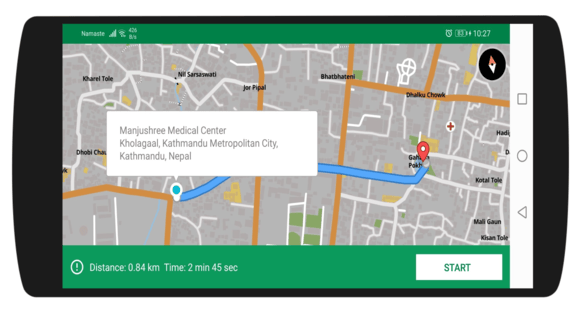
A mocked navigation session
1
Add a MapView to the layout
<?xml version="1.0" encoding="utf-8"?>
    <com.mapbox.mapboxsdk.maps.MapView
        android:id="@+id/mapView"
        android:layout_width="match_parent"
        android:layout_height="match_parent"
        mapbox:mapbox_cameraTargetLat="27.7084"
        mapbox:mapbox_cameraTargetLng="85.3206"
        mapbox:mapbox_cameraZoom="13"
        />
2
Implement NavigationEventListener and build the options
@Override
  public void onRunning(boolean running) {
  // do something
  }

MapboxNavigationOptions options = MapboxNavigationOptions.builder()
                .build();
        navigation = new MapboxNavigation(this, "pk.xxx", options);

        // you can also add custom milestone
        navigation.addMilestone(new RouteMilestone.Builder()
                .setIdentifier(BEGIN_ROUTE_MILESTONE)
                .setInstruction(new BeginRouteInstruction())
                .setTrigger(
                        Trigger.all(
                                Trigger.lt(TriggerProperty.STEP_INDEX, 3),
                                Trigger.gt(TriggerProperty.STEP_DISTANCE_TOTAL_METERS, 200),
                                Trigger.gte(TriggerProperty.STEP_DISTANCE_TRAVELED_METERS, 75)
                        )
                ).build());
3
Set the render mode and the replay engine
 locationLayerPlugin.setRenderMode(RenderMode.GPS);
 locationLayerPlugin.setLocationLayerEnabled(false);
 navigationMapRoute = new NavigationMapRoute(navigation, mapView, mapboxMap);
 navigationMapRoute.addRoute(route);
 locationEngine = new ReplayRouteLocationEngine();
4
Attach the listeners once navigation is ready
  // Attach navigation listeners.
            navigation.addNavigationEventListener(this);
            navigation.addProgressChangeListener(this);
            navigation.addMilestoneEventListener(this);
            navigation.addOffRouteListener(this);

  // Attach the replay engine
  ((ReplayRouteLocationEngine) locationEngine).assign(route);
            navigation.setLocationEngine(locationEngine);
            locationLayerPlugin.setLocationLayerEnabled(true);

  // Start navigation
            navigation.startNavigation(route);
5
Update location and instructions on progress
  @Override
    public void onProgressChange(Location location, RouteProgress routeProgress) {

        // Cache "snapped" Locations for re-route Directions API requests

            if (location == null) {
                location = lastLocation;
            }
            locationLayerPlugin.forceLocationUpdate(location);
            moveCameraTo(location);
            // Update InstructionView data from RouteProgress
            instructionView.update(routeProgress);
            summaryBottomSheet.update(routeProgress);
    }
MockNavigationHelperActivity, passing
directionsResponse, origin and lastLocation as intent extras — the same handoff as the
real navigation UI, minus the destination.
MockNavigationHelperActivity.java — the full helper
MockNavigationHelperActivity.java — the full helper
View on GitHub
package com.baato.baatoandroiddemo.activities;

import android.annotation.SuppressLint;
import android.content.BroadcastReceiver;
import android.content.Context;
import android.content.Intent;
import android.content.res.Resources;
import android.location.Location;
import android.os.Build;
import android.os.Bundle;
import android.os.VibrationEffect;
import android.os.Vibrator;
import android.util.Log;
import android.view.View;
import android.widget.Toast;

import androidx.annotation.NonNull;
import androidx.appcompat.app.AppCompatActivity;
import androidx.constraintlayout.widget.ConstraintLayout;
import androidx.transition.TransitionManager;

import com.example.baatoandroiddemo.R;
import com.google.android.material.snackbar.Snackbar;
import com.baato.baatolibrary.models.DirectionsAPIResponse;
import com.baato.baatolibrary.services.BaatoRouting;
import com.mapbox.android.core.location.LocationEngine;
import com.mapbox.api.directions.v5.models.DirectionsResponse;
import com.mapbox.api.directions.v5.models.DirectionsRoute;
import com.mapbox.geojson.Point;
import com.mapbox.mapboxsdk.Mapbox;
import com.mapbox.mapboxsdk.camera.CameraPosition;
import com.mapbox.mapboxsdk.camera.CameraUpdateFactory;
import com.mapbox.mapboxsdk.geometry.LatLng;
import com.mapbox.mapboxsdk.geometry.LatLngBounds;
import com.mapbox.mapboxsdk.maps.MapView;
import com.mapbox.mapboxsdk.maps.MapboxMap;
import com.mapbox.mapboxsdk.maps.OnMapReadyCallback;
import com.mapbox.mapboxsdk.plugins.locationlayer.LocationLayerPlugin;
import com.mapbox.mapboxsdk.plugins.locationlayer.modes.RenderMode;
import com.mapbox.services.android.navigation.ui.v5.instruction.InstructionView;
import com.mapbox.services.android.navigation.ui.v5.map.NavigationMapboxMap;
import com.mapbox.services.android.navigation.ui.v5.route.NavigationMapRoute;
import com.mapbox.services.android.navigation.ui.v5.summary.SummaryBottomSheet;
import com.mapbox.services.android.navigation.ui.v5.voice.NavigationSpeechPlayer;
import com.mapbox.services.android.navigation.ui.v5.voice.SpeechAnnouncement;
import com.mapbox.services.android.navigation.ui.v5.voice.SpeechPlayerProvider;
import com.mapbox.services.android.navigation.v5.instruction.Instruction;
import com.mapbox.services.android.navigation.v5.location.replay.ReplayRouteLocationEngine;
import com.mapbox.services.android.navigation.v5.milestone.Milestone;
import com.mapbox.services.android.navigation.v5.milestone.MilestoneEventListener;
import com.mapbox.services.android.navigation.v5.milestone.RouteMilestone;
import com.mapbox.services.android.navigation.v5.milestone.Trigger;
import com.mapbox.services.android.navigation.v5.milestone.TriggerProperty;
import com.mapbox.services.android.navigation.v5.milestone.VoiceInstructionMilestone;
import com.mapbox.services.android.navigation.v5.navigation.MapboxNavigation;
import com.mapbox.services.android.navigation.v5.navigation.MapboxNavigationOptions;
import com.mapbox.services.android.navigation.v5.navigation.NavigationEventListener;
import com.mapbox.services.android.navigation.v5.offroute.OffRouteListener;
import com.mapbox.services.android.navigation.v5.routeprogress.ProgressChangeListener;
import com.mapbox.services.android.navigation.v5.routeprogress.RouteProgress;

import java.lang.ref.WeakReference;
import java.util.List;
import java.util.Locale;

public class MockNavigationHelperActivity extends AppCompatActivity implements OnMapReadyCallback, ProgressChangeListener,
        MilestoneEventListener, OffRouteListener, NavigationEventListener {

    private static final int FIRST = 0;
    private static final int ONE_HUNDRED_MILLISECONDS = 100;
    private static final int BOTTOMSHEET_PADDING_MULTIPLIER = 4;
    private static final int TWO_SECONDS_IN_MILLISECONDS = 2000;
    private static final double BEARING_TOLERANCE = 90d;
    private static final String LONG_PRESS_MAP_MESSAGE = "Long press the map to select a destination.";
    private static final String SEARCHING_FOR_GPS_MESSAGE = "Searching for GPS...";
    private static final int ZERO_PADDING = 0;
    private static final double DEFAULT_ZOOM = 14.0;
    private static final double DEFAULT_TILT = 0d;
    private static final double DEFAULT_BEARING = 0d;
    private static final int ONE_SECOND_INTERVAL = 1000;
    private static final int BEGIN_ROUTE_MILESTONE = 1001;

    ConstraintLayout navigationLayout;

    MapView mapView;
    InstructionView instructionView;
    SummaryBottomSheet summaryBottomSheet;

    private LocationEngine locationEngine;
    private LocationLayerPlugin locationLayerPlugin;
    private MapboxNavigation navigation;
    private NavigationSpeechPlayer speechPlayer;
    private NavigationMapboxMap navigationMap;
    private Location lastLocation;
    private DirectionsRoute route;
    private Point destination;
    private MockNavigationHelperActivity.MapState mapState;
    private MapboxMap mapboxMap;
    private String navigationMode = "car";
    private Point origin;
    DirectionsResponse directionsResponse;
    private NavigationMapRoute navigationMapRoute;

    @Override
    public void onRunning(boolean running) {

    }

    private static class MyBroadcastReceiver extends BroadcastReceiver {
        private final WeakReference<MapboxNavigation> weakNavigation;

        MyBroadcastReceiver(MapboxNavigation navigation) {
            this.weakNavigation = new WeakReference<>(navigation);
        }

        @Override
        public void onReceive(Context context, Intent intent) {
            MapboxNavigation navigation = weakNavigation.get();
            navigation.stopNavigation();
        }
    }

    private enum MapState {
        INFO,
        NAVIGATION
    }

    @Override
    protected void onCreate(Bundle savedInstanceState) {
        super.onCreate(savedInstanceState);
        // For styling the InstructionView
        setTheme(R.style.CustomInstructionView);
        setContentView(R.layout.activity_component_navigation);
        Mapbox.getInstance(getApplicationContext(), getString(R.string.mapbox_token));

        mapView = findViewById(R.id.mapView);
        navigationLayout = findViewById(R.id.componentNavigationLayout);
        instructionView = findViewById(R.id.instructionView);
        summaryBottomSheet = findViewById(R.id.summaryBottomSheet);

        Bundle extras = getIntent().getExtras();

        if (extras != null) {
            directionsResponse = (DirectionsResponse) extras.get("Route");
            route = directionsResponse.routes().get(0);
            origin = (Point) extras.get("origin");
            lastLocation = (Location) extras.get("lastLocation");
            // and get whatever type user account id is
        }

        mapView.onCreate(savedInstanceState);

        // Will call onMapReady
        mapView.getMapAsync(this);

        MapboxNavigationOptions options = MapboxNavigationOptions.builder()
                .build();
        navigation = new MapboxNavigation(this, getString(R.string.mapbox_token), options);
        navigation.addMilestone(new RouteMilestone.Builder()
                .setIdentifier(BEGIN_ROUTE_MILESTONE)
                .setInstruction(new BeginRouteInstruction())
                .setTrigger(
                        Trigger.all(
                                Trigger.lt(TriggerProperty.STEP_INDEX, 3),
                                Trigger.gt(TriggerProperty.STEP_DISTANCE_TOTAL_METERS, 200),
                                Trigger.gte(TriggerProperty.STEP_DISTANCE_TRAVELED_METERS, 75)
                        )
                ).build());
    }

    private static class BeginRouteInstruction extends Instruction {

        @Override
        public String buildInstruction(RouteProgress routeProgress) {
            return "Have a safe trip!";
        }
    }

    @Override
    public void onMapReady(MapboxMap mapboxMap) {
        this.mapboxMap = mapboxMap;
        //remove mapbox attribute
        mapboxMap.getUiSettings().setAttributionEnabled(false);
        mapboxMap.getUiSettings().setLogoEnabled(false);
        mapboxMap.setStyleUrl("https://api.baato.io/api/v1/styles/monochrome?key=" + getString(R.string.baato_access_token),
                style -> {
                    mapboxMap.setCameraPosition(new CameraPosition.Builder()
                            .target(new LatLng(origin.latitude(), origin.longitude()))
                            .zoom(14)
                            .build());
                    mapState = MapState.NAVIGATION;
                    locationLayerPlugin = new LocationLayerPlugin(mapView, mapboxMap);
                    locationLayerPlugin.setRenderMode(RenderMode.GPS);
                    locationLayerPlugin.setLocationLayerEnabled(false);
                    navigationMapRoute = new NavigationMapRoute(navigation, mapView, mapboxMap);
                    navigationMapRoute.addRoute(route);
                    locationEngine = new ReplayRouteLocationEngine();
                    onNavigationReady();
                });

    }

    public void onNavigationReady() {
        if (navigation != null && route != null) {
            // Transition to navigation state
            TransitionManager.beginDelayedTransition(navigationLayout);
            instructionView.setVisibility(View.VISIBLE);
            summaryBottomSheet.setVisibility(View.VISIBLE);
            // Attach all of our navigation listeners.
            navigation.addNavigationEventListener(this);
            navigation.addProgressChangeListener(this);
            navigation.addMilestoneEventListener(this);
            navigation.addOffRouteListener(this);

            ((ReplayRouteLocationEngine) locationEngine).assign(route);
            navigation.setLocationEngine(locationEngine);
            locationLayerPlugin.setLocationLayerEnabled(true);
            navigation.startNavigation(route);
        }
    }

    /*
     * Navigation listeners
     */

    @Override
    public void onProgressChange(Location location, RouteProgress routeProgress) {

        // Cache "snapped" Locations for re-route Directions API requests

        if (location == null) {
            location = lastLocation;
        }

        locationLayerPlugin.forceLocationUpdate(location);
        moveCameraTo(location);
        // Update InstructionView data from RouteProgress
        instructionView.update(routeProgress);
        summaryBottomSheet.update(routeProgress);
    }

    @Override
    public void onMilestoneEvent(RouteProgress routeProgress, String instruction, Milestone milestone) {
        Log.d("milestone", String.valueOf(milestone));
        playAnnouncement(milestone);
    }

    @Override
    public void userOffRoute(Location location) {
        calculateRouteWith(destination, true);
    }

    /*
     * Activity lifecycle methods
     */

    @Override
    public void onResume() {
        super.onResume();
        mapView.onResume();
    }

    @Override
    public void onPause() {
        super.onPause();
        mapView.onPause();
    }

    @Override
    protected void onStart() {
        super.onStart();
        mapView.onStart();
        if (locationLayerPlugin != null) {
            locationLayerPlugin.onStart();
        }
    }

    @Override
    protected void onSaveInstanceState(Bundle outState) {
        super.onSaveInstanceState(outState);
        mapView.onSaveInstanceState(outState);
    }

    @Override
    protected void onStop() {
        super.onStop();
        mapView.onStop();
        if (locationLayerPlugin != null) {
            locationLayerPlugin.onStop();
        }
    }

    @Override
    public void onLowMemory() {
        super.onLowMemory();
        mapView.onLowMemory();
    }

    @Override
    protected void onDestroy() {
        super.onDestroy();
//        mapView.onDestroy();

        // Ensure proper shutdown of the SpeechPlayer
        if (speechPlayer != null) {
            speechPlayer.onDestroy();
        }
        if (navigation != null) {
//            ((DynamicCamera) navigation.getCameraEngine()).clearMap();
            // MapboxNavigation will shutdown the LocationEngine
            navigation.onDestroy();
        }
        locationEngine.removeLocationUpdates();
        locationEngine.deactivate();
        mapView.onDestroy();
    }

    private void initializeSpeechPlayer() {
        String english = Locale.US.getLanguage();
        String accessToken = Mapbox.getAccessToken();
//      String accessToken = "pk.xxx";
        SpeechPlayerProvider speechPlayerProvider = new SpeechPlayerProvider(getApplication(), english, true, accessToken);
        speechPlayer = new NavigationSpeechPlayer(speechPlayerProvider);
    }

    private void showSnackbar(String text, int duration) {
        Snackbar.make(navigationLayout, text, duration).show();
    }

    private void playAnnouncement(Milestone milestone) {
        if (milestone instanceof VoiceInstructionMilestone) {
            SpeechAnnouncement announcement = SpeechAnnouncement.builder()
                    .voiceInstructionMilestone((VoiceInstructionMilestone) milestone)
                    .build();
            Log.d("Announcement", announcement.toString());
            speechPlayer.play(announcement);
        }
    }

    private void moveCameraTo(Location location) {
        CameraPosition cameraPosition = buildCameraPositionFrom(location, location.getBearing());
        mapboxMap.animateCamera(
                CameraUpdateFactory.newCameraPosition(cameraPosition), TWO_SECONDS_IN_MILLISECONDS
        );
    }

    private void moveCameraToInclude(Point destination) {
        LatLng origin = new LatLng(lastLocation);
        LatLngBounds bounds = new LatLngBounds.Builder()
                .include(origin)
                .include(new LatLng(destination.latitude(), destination.longitude()))
                .build();
        Resources resources = getResources();
        int routeCameraPadding = 56;
        int[] padding = {routeCameraPadding, routeCameraPadding, routeCameraPadding, routeCameraPadding};
        CameraPosition cameraPosition = navigationMap.retrieveMap().getCameraForLatLngBounds(bounds, padding);
        navigationMap.retrieveMap().animateCamera(
                CameraUpdateFactory.newCameraPosition(cameraPosition), TWO_SECONDS_IN_MILLISECONDS
        );
    }

    private void moveCameraOverhead() {
        if (lastLocation == null) {
            return;
        }
        CameraPosition cameraPosition = buildCameraPositionFrom(lastLocation, DEFAULT_BEARING);
        navigationMap.retrieveMap().animateCamera(
                CameraUpdateFactory.newCameraPosition(cameraPosition), TWO_SECONDS_IN_MILLISECONDS
        );
    }

    @NonNull
    private CameraPosition buildCameraPositionFrom(Location location, double bearing) {
        return new CameraPosition.Builder()
                .zoom(DEFAULT_ZOOM)
                .target(new LatLng(location.getLatitude(), location.getLongitude()))
                .bearing(bearing)
                .tilt(DEFAULT_TILT)
                .build();
    }

    private void adjustMapPaddingForNavigation() {
        Resources resources = getResources();
        int mapViewHeight = mapView.getHeight();
        int bottomSheetHeight = 96;
        int topPadding = mapViewHeight - (bottomSheetHeight * BOTTOMSHEET_PADDING_MULTIPLIER);
        navigationMap.retrieveMap().setPadding(ZERO_PADDING, topPadding, ZERO_PADDING, ZERO_PADDING);
    }

    private void resetMapAfterNavigation() {
        navigationMap.removeRoute();
        navigationMap.clearMarkers();
        navigation.stopNavigation();
        moveCameraOverhead();
    }

    private void calculateRouteWith(Point destination, boolean isOffRoute) {
        Point origin = Point.fromLngLat(lastLocation.getLongitude(), lastLocation.getLatitude());
        Double bearing = Float.valueOf(lastLocation.getBearing()).doubleValue();
        getRoute(origin, destination, isOffRoute);
    }

    private void getRoute(Point origin, Point destination, boolean isOffRoute) {
        String[] points = new String[2];
        points[0] = origin.latitude() + "," + origin.longitude();
        points[1] = destination.latitude() + "," + destination.longitude();

        new BaatoRouting(this)
                .setPoints(points)
                .setAccessToken(getString(R.string.baato_access_token))
                .setMode(navigationMode) //eg bike, car, foot
                .setAlternatives(false) //optional parameter
                .setInstructions(true) //optional parameter
                .withListener(new BaatoRouting.BaatoRoutingRequestListener() {
                    @Override
                    public void onSuccess(DirectionsAPIResponse directionResponse) {
                        com.baato.baatolibrary.models.NavResponse navResponse = directionResponse.getData().get(0);
                        String parsedNavigationResponse = BaatoRouting.getParsedNavResponse(directionResponse, navigationMode);
                        DirectionsResponse directionsResponse = DirectionsResponse.fromJson(parsedNavigationResponse);
                        route = directionsResponse.routes().get(0);
                        handleRoute(directionsResponse, isOffRoute);
                    }

                    @Override
                    public void onFailed(Throwable t) {
                        if (t.getMessage() != null && t.getMessage().contains("Failed to connect"))
                            Toast.makeText(getApplicationContext(), "Please connect to internet to get the routes!", Toast.LENGTH_SHORT).show();

                    }
                })
                .doRequest();
    }

    private void handleRoute(DirectionsResponse response, boolean isOffRoute) {
        List<DirectionsRoute> routes = response.routes();
        if (!routes.isEmpty()) {
            route = routes.get(FIRST);
            navigationMap.drawRoute(route);
            if (isOffRoute) {
                navigation.startNavigation(route);
            }
        }
    }

    @SuppressLint("MissingPermission")
    private void vibrate() {
        Vibrator vibrator = (Vibrator) getSystemService(Context.VIBRATOR_SERVICE);
        if (Build.VERSION.SDK_INT >= Build.VERSION_CODES.O) {
            vibrator.vibrate(VibrationEffect.createOneShot(ONE_HUNDRED_MILLISECONDS, VibrationEffect.DEFAULT_AMPLITUDE));
        } else {
            vibrator.vibrate(ONE_HUNDRED_MILLISECONDS);
        }
    }
}
Full source
ComponentNavigationActivity
The route screen built in this guide.
MockNavigationActivity
The mocked navigation session.